


5 Ways AI Agents Fail in Production & How to Catch Them

Prerna Sahni
AI Agents
Introduction: Why AI Agents Fail After Going Live
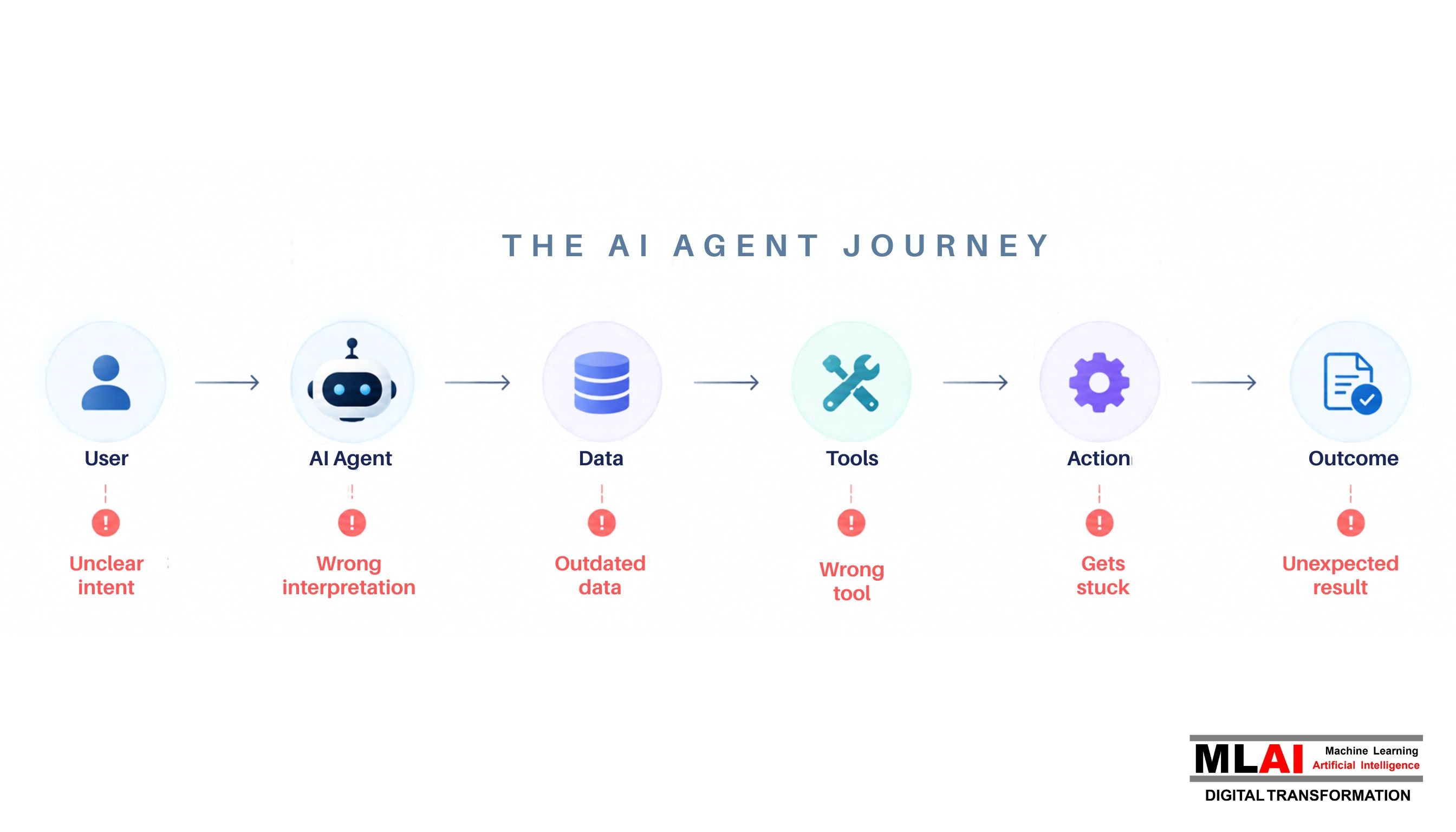
AI agent failures often appear only after an agent moves from a controlled testing environment into the real world. During development, an agent may work smoothly because the inputs are predictable, the data is clean, and the connected systems are available. Production is different. Users ask ambiguous questions, enterprise data changes, APIs fail, and unexpected workflows appear.
This is the gap between a successful AI demo and a reliable production AI agent.
Unlike a traditional software application that follows predefined rules, an AI agent can interpret a request, reason about what to do next, select a tool, retrieve information, and take an action. That flexibility makes agents powerful, but it also introduces more points where something can go wrong.
For example, an agent might understand a customer's request correctly but select the wrong workflow. It might retrieve an outdated document and provide an incorrect answer. It could repeatedly call a failed API, increasing costs without completing the task. In another situation, an unusual user request could cause the agent to behave differently from what developers expected.
These issues are not reasons to avoid agentic AI. They are reasons to build production controls around it.
In this, we will look at five common ways AI agents fail in production and how organizations can detect and manage these problems before they turn into larger business issues.
1. AI Agents Take the Wrong Action
One of the most serious problems with an AI agent is not simply giving the wrong answer. It is taking the wrong action.
A conversational AI system might provide incorrect information that a user can ignore or correct. An agent with access to enterprise tools can potentially update a record, send an email, trigger a workflow, or perform another business action.
That makes action accuracy just as important as response accuracy.
An agent can have the right overall objective and still make a mistake somewhere in the execution process.
1.1 How Agents Misunderstand User Intent
Real users rarely communicate in perfectly structured instructions.
They might say:
"Update that account."
"Send the latest version."
"Cancel the previous request."
"Check the other customer."
"Take care of this."
A human employee can often understand these requests because they have context. An AI agent needs to infer that context from the conversation, available data, and connected systems.
Problems occur when the context is incomplete or when multiple interpretations are possible.
Consider a customer service agent that receives:
"Please update the address."
Which customer? Which account? Which address? Does the user want the billing address changed, the mailing address changed, or both?
If the agent guesses instead of asking for clarification, the resulting action could be incorrect.
A reliable agent should know when it has enough information to act and when it needs clarification.
For low-risk tasks, making a reasonable assumption may be acceptable. For high-impact actions, validation should happen before execution.
1.2 Incorrect Tool Selection or Unnecessary Tool Calls
Agents often have access to several tools. Depending on the business use case, these could include databases, CRM systems, search engines, document repositories, email systems, or internal APIs.
More tools do not automatically mean a better agent.
In fact, unnecessary tools can increase the chances of failure.
An agent might select a write operation when it should first perform a read operation. It might call a database even though the required information is already available. It may also choose a technically valid tool that is not appropriate for the current workflow.
These decisions matter because every tool call creates another point where something can fail.
Tool descriptions should therefore be clear, and permissions should be limited to what the agent actually needs.
Example: An Agent Choosing the Wrong Workflow
Imagine an insurance operations agent that can either create a new customer record or update an existing one.
A user says:
"The customer's address has changed. Update the record."
If the agent fails to identify the existing customer and starts a new-customer workflow, it could create a duplicate record instead of making the required update.
The result might include duplicate customer information, additional verification work, incorrect reporting, and unnecessary manual intervention.
The problem is not necessarily that the model cannot understand the words. The problem is that the system allowed the agent to move from interpretation to execution without enough validation.
1.3 How to Catch It
Organizations should monitor the agent's actions, not just its final response.
Useful controls include:
Tool-call monitoring
Action logs
Execution tracing
Input validation
Permission controls
Workflow guardrails
Human approval for high-impact actions
For sensitive workflows, the agent can prepare the action while a human approves it before execution.
This approach allows organizations to retain the efficiency of automation without giving an agent unlimited authority.
2. AI Agents Hallucinate or Use the Wrong Information
Another common source of AI agent failures is incorrect information.
Connecting an agent to enterprise data can reduce hallucinations, but it does not eliminate them.
The agent still has to find the right information, understand it correctly, and determine whether it is current and relevant.
Enterprise data can contain old policies, duplicate files, conflicting documents, incomplete records, and information maintained by different teams.
That creates another challenge: sometimes the information exists, but the agent uses the wrong version.
2.1 Why Agents Can Generate Incorrect Information Even with Access to Enterprise Data
Consider an employee asking an agent:
"What is the current approval limit for this transaction?"
The agent finds three internal documents.
One contains an old limit. Another contains a revised limit. A third contains a newer policy with an exception for a specific business unit.
If the retrieval system does not identify the authoritative source, the agent can produce an answer that sounds convincing but is wrong for the situation.
This is why connecting an LLM to a knowledge base is not enough.
Organizations need to consider data quality, document freshness, retrieval quality, source priority, and context.
2.2 Outdated, Incomplete, or Conflicting Information
Enterprise information changes constantly.
Policies are updated. Processes change. Customer records are modified. New documents replace old ones.
An agent that retrieves outdated information can make a perfectly logical decision based on an incorrect context.
Incomplete information creates another problem.
If the agent receives only part of a document, it may miss an important condition or exception.
Conflicting information is even more difficult because the agent must determine which source should be trusted.
A strong enterprise architecture should establish clear source priorities, so the agent knows which information takes precedence.
2.3 Problems Caused by Poor Retrieval or Context
Retrieval systems can fail even when the required information exists.
A search may return a document containing the correct keyword but not the answer the user actually needs. Alternatively, the right document may be retrieved but the relevant section may not be included in the context provided to the model.
This creates a simple rule:
Better retrieval leads to better context, and better context gives the agent a stronger basis for its decision.
For important workflows, the agent should ideally identify the source it used and verify that the information is appropriate before relying on it.
2.4 How to Catch It
Organizations can use several controls to detect information-related failures:
Response evaluation
Source verification
Retrieval monitoring
Groundedness checks
Confidence checks
Human review for high-risk outputs
Monitoring should cover both the final answer and the information used to produce it.
This is important because an answer can look correct while the underlying retrieval process was poor.
Continuous evaluation also matters. A knowledge base update can change an agent's behavior even when the model and prompt remain unchanged.
3. AI Agents Get Stuck in Loops
Agents are designed to work through multiple steps.
They may retrieve information, call a tool, examine the result, and then decide what to do next.
But when an agent cannot make progress, it may repeat the same operation.
This creates another category of AI agent failures: loops.
3.1 Repeated Tool Calls or Reasoning Cycles
Imagine an agent needs information from an internal API.
It makes a request.
The API returns an error.
Instead of recognizing the failure, the agent makes the same request again.
The API fails again.
The agent retries once more.
From the user's perspective, the application simply appears slow. Internally, however, the agent is consuming additional model calls and API resources without making progress.
Loops can also occur when an agent repeatedly searches for the same information or moves between two tools without reaching a useful outcome.
3.2 Agents Retrying Failed Actions Without Making Progress
Retries are useful when failures are temporary.
For example, a short network interruption may be resolved by trying again after a delay.
The problem occurs when the agent keeps retrying without changing its strategy.
A failed API call does not become successful simply because it was repeated ten times.
Production agents need defined retry policies and clear stopping conditions.
They should be able to recognize when an operation is unlikely to succeed and move to a fallback path or request human intervention.
3.3 Why Loops Increase Latency and Operational Costs
Uncontrolled loops create both technical and financial problems.
Every additional model call increases processing cost. Every tool call consumes system resources. Every unnecessary step increases latency.
A task that normally takes six operations might suddenly require twenty or thirty if the agent gets stuck.
At small scale, this may look like a performance issue.
At enterprise scale, it can become an operational cost problem.
This is why organizations should measure not only whether a task succeeds, but also how efficiently it succeeds.
3.4 How to Catch It
Several controls can help:
Maximum iteration limits: Define how many steps an agent can execute for a task.
Timeout controls: Stop workflows that run beyond an acceptable period.
Loop detection: Identify repeated calls, repeated parameters, or recurring execution states.
Execution tracing: Record the sequence of actions so teams can identify where progress stopped.
Failure-aware retries: Retry temporary failures within defined limits rather than repeating the same operation indefinitely.
A reliable agent should have a clear answer to one important question:
When should I stop?
Sometimes stopping safely is better than continuing unsuccessfully.
4. AI Agents Fail When Tools or Systems Fail
An AI agent is only one part of a larger technology environment.
Most enterprise agents depend on APIs, databases, authentication services, CRM platforms, document systems, or internal applications.
If one of these systems fails, the agent may also be affected.
This means AI agent failures are not always caused by the model itself.
4.1 What Happens When APIs, Databases, or Enterprise Systems Are Unavailable
Suppose an agent needs to retrieve a customer's transaction history.
The database is unavailable.
The agent cannot access the required information.
A poorly designed workflow may continue anyway or repeatedly attempt the same request.
A reliable system should recognize that the dependency is unavailable and respond accordingly.
Depending on the workflow, it might retry, use a fallback source, save the task for later, or escalate it to a human.
Most importantly, it should not claim that an action was completed when the connected system did not confirm it.
4.2 Timeout, Rate-Limit, Authentication, and Integration Failures
Production systems can fail for many reasons.
Timeouts occur when a service does not respond within the expected period.
Rate limits occur when an application exceeds the allowed number of requests.
Authentication failures can happen when credentials expire or permissions change.
Integration failures may occur when an API changes its response structure.
There can also be partial failures.
For example, an agent might successfully update a CRM but fail to update the connected billing system.
The task is now only partially complete.
Without appropriate controls, the agent may continue as if everything worked.
4.3 Why Agents Need to Handle Partial Failures Instead of Simply Stopping
Traditional software engineering already provides useful patterns for handling unreliable systems.
Agents can use:
Retries
Timeouts
Circuit breakers
Queues
Fallback workflows
State preservation
Safe recovery procedures
The agent should understand whether a failure is temporary, permanent, or requires human intervention.
For example, a temporary network issue may justify a retry.
An authentication failure may require escalation.
A permission error should not simply trigger repeated requests.
The recovery strategy should depend on the type of failure.
4.4 How to Catch It
Production monitoring should track:
API errors
Tool-call failures
Timeout rates
Authentication failures
Rate-limit events
Retry counts
Partial workflow failures
Fallback usage
Combining these signals with execution tracing makes troubleshooting much easier.
Teams can see whether the agent made a poor decision or whether one of its dependencies failed.
5. AI Agents Behave Unexpectedly Under Real-World Inputs
The fifth problem is one of the hardest to completely eliminate.
Real users are unpredictable.
They use different wording, provide incomplete information, upload unusual files, combine multiple requests, and sometimes intentionally try to manipulate the system.
This is where many AI agent failures become visible after deployment.
5.1 Why Production Users Behave Differently From Test Users
Testing usually focuses on expected scenarios.
A team might verify that an agent can retrieve a document, answer a question, update a record, or complete a standard workflow.
Real users introduce situations that were never included in the original test cases.
Someone may upload a damaged PDF.
Another user may enter an incorrect account number.
Someone may ask two unrelated questions in the same message.
A customer may provide information in an unexpected format.
These situations do not necessarily mean the agent is poorly designed. They demonstrate why production testing needs to account for real-world variability.
5.2 Ambiguous Requests, Unusual Inputs, Prompt Injection, and Unexpected Workflows
Ambiguity can be especially dangerous when the agent has permission to take action.
For example:
"Send the report to the client."
The agent needs to know which report, which client, whether the user is authorized, and whether the report contains information that can be shared externally.
When important information is missing, asking a clarification question is safer than guessing.
Prompt injection presents another challenge.
An unexpected instruction can attempt to manipulate an agent into ignoring its intended task, exposing information, or using tools in ways it was not supposed to.
This risk increases as agents become more autonomous and gain access to enterprise systems.
Organizations should therefore combine model-level safeguards with access controls, tool restrictions, validation, and monitoring.
5.3 How Small Changes in Prompts, Models, or Data Can Affect Behavior
Agent behavior is influenced by more than the model.
A change to the system prompt can alter how the agent selects tools.
A new model version can change how it interprets instructions.
A change in retrieval can modify the information it receives.
Adding a new tool can create new possible execution paths.
Updating enterprise data can change its answers.
This is why changes should be tested before reaching production.
Regression testing should cover important business scenarios whenever prompts, models, tools, or workflows change.
5.4 How to Catch It
Useful approaches include:
Continuous testing
Production monitoring
Red-team testing
Anomaly detection
Regression testing
Production data can also help improve testing over time.
When a new edge case appears, it can become part of the future test set.
This creates a feedback loop where the system becomes more resilient as organizations learn from real-world behavior.
How to Catch AI Agent Failures Before They Become Business Problems
The best time to detect an agent problem is before it affects a customer, employee, or business process.
That requires visibility into the complete agent workflow.
Teams should be able to understand what the user requested, what the agent interpreted, what information it retrieved, which tools it used, what errors occurred, and whether the final task was successful.
This is the foundation of agent observability.
1. Monitor Agent Decisions, Tool Calls, Errors, and Outcomes
Monitoring only the final response is not enough.
An agent could produce the correct answer after making several unnecessary tool calls.
It could also provide a reasonable-looking response after a critical dependency failed.
Execution-level monitoring gives teams visibility into the path taken by the agent.
2. Track Important Production Metrics
Organizations should monitor metrics that reflect actual business performance.
These include task success rate, response time, tool failures, retries, cost, and human intervention.
A sudden change in any of these metrics can reveal a problem.
For example, a sharp increase in retries may indicate an unstable API.
A drop in task success may indicate a workflow or model change.
An increase in human intervention may indicate that an agent is struggling with a particular task.
3. Evaluate Agent Performance Continuously
Evaluation should continue after deployment.
Agents operate in environments that change.
Models are updated. Prompts are modified. Data changes. New tools are introduced.
Continuous evaluation helps teams identify regressions before they become widespread.
4. Set Up Alerts for Unusual Behavior
Teams should establish thresholds for unusual activity.
Alerts can be triggered when:
Tool calls increase unexpectedly
Task success falls
Retry counts rise
Response times increase
Costs spike
Human intervention increases
The purpose of alerts is not to eliminate every failure.
It is to make important failures visible quickly.
5. Keep Humans in the Loop for High-Risk Actions
Not every task requires human approval.
A simple information lookup may be safe to automate.
A financial transaction, sensitive customer update, or compliance-related action may require human review.
Risk-based human oversight allows organizations to benefit from automation while maintaining appropriate control.
Key Metrics to Monitor for Production AI Agents
Measuring an agent requires more than asking whether its answers are accurate.
Organizations should measure how well the entire workflow performs.
1. Task Success Rate
This measures how often the agent actually completes the intended task.
It is more useful than response accuracy alone because an agent can provide a good answer without completing the business objective.
2. Hallucination/Error Rate
Track how frequently the agent provides incorrect, unsupported, or misleading information.
For important applications, evaluation should use trusted sources or human review where appropriate.
3. Tool-Call Failure Rate
This measures how frequently connected tools fail.
A high rate may indicate API, authentication, permission, or integration problems.
4. Average Response Time
Latency affects user experience and productivity.
For multi-step agents, teams should also examine where time is being spent.
5. Number of Retries
Retries can be normal, but consistently high retry counts may indicate a system or workflow problem.
6. Cost per Task
Successful automation can still be inefficient.
Tracking cost per task helps identify unnecessary model calls, excessive retrieval, and repeated tool usage.
7. Human Intervention Rate
This shows how often people need to take over.
A high intervention rate may indicate that the agent needs better instructions, narrower permissions, stronger validation, or a different workflow design.
These metrics together provide a more complete view of AI agent reliability.
8. Building More Reliable AI Agents
Reliable AI agents require more than a capable model.
They need clear boundaries, appropriate permissions, validation, monitoring, and continuous testing.
9. Design Agents With Clear Boundaries
An agent should have a clearly defined role.
If an agent is designed to answer questions about customer policies, it does not necessarily need permission to modify customer accounts.
A narrower scope makes the system easier to test and reduces potential risks.
10. Give Agents Only the Tools and Permissions They Need
The principle of least privilege is particularly important for autonomous systems.
If an agent only needs read access, it should not have write access.
If it needs to update one type of record, it should not automatically have permission to modify unrelated systems.
Reducing unnecessary access limits the potential impact of AI agent failures.
11. Add Validation Before Critical Actions
Critical actions should have additional checks.
The system may verify the user, target record, required information, business rules, and authorization before allowing the action to proceed.
For high-risk workflows, human approval can provide another layer of protection.
12. Use Observability and Evaluation From Day One
Observability should not be added after the first production incident.
Logging, tracing, metrics, and evaluation should be part of the initial architecture.
Teams should be able to investigate an agent's behavior without reconstructing the entire workflow manually.
13. Continuously Test Agents Against Real-World Scenarios
Testing should extend beyond ideal scenarios.
Organizations should test ambiguous requests, missing information, conflicting data, failed tools, slow systems, unexpected documents, permission failures, and adversarial inputs.
The objective is not to build an agent that never fails.
No complex production system can guarantee that.
The objective is to ensure that when something goes wrong, the failure is controlled, visible, recoverable, and appropriate to the risk involved.
Conclusion
AI agent failures are rarely caused by one dramatic mistake. They usually emerge from weaknesses in decision-making, information retrieval, tool use, system dependencies, or unexpected user inputs. The best defense is to build reliability into the agent from the beginning through monitoring, evaluation, observability, validation, and appropriate human oversight. Organizations should track task success, errors, tool calls, retries, latency, cost, and human intervention to identify problems early. Clear boundaries and limited permissions further reduce risk. Ultimately, production-ready agents are not defined by never failing. They are defined by their ability to detect failures, recover safely, and remain trustworthy when real-world conditions become unpredictable.
Introduction: Why AI Agents Fail After Going Live
AI agent failures often appear only after an agent moves from a controlled testing environment into the real world. During development, an agent may work smoothly because the inputs are predictable, the data is clean, and the connected systems are available. Production is different. Users ask ambiguous questions, enterprise data changes, APIs fail, and unexpected workflows appear.
This is the gap between a successful AI demo and a reliable production AI agent.
Unlike a traditional software application that follows predefined rules, an AI agent can interpret a request, reason about what to do next, select a tool, retrieve information, and take an action. That flexibility makes agents powerful, but it also introduces more points where something can go wrong.
For example, an agent might understand a customer's request correctly but select the wrong workflow. It might retrieve an outdated document and provide an incorrect answer. It could repeatedly call a failed API, increasing costs without completing the task. In another situation, an unusual user request could cause the agent to behave differently from what developers expected.
These issues are not reasons to avoid agentic AI. They are reasons to build production controls around it.
In this, we will look at five common ways AI agents fail in production and how organizations can detect and manage these problems before they turn into larger business issues.
1. AI Agents Take the Wrong Action
One of the most serious problems with an AI agent is not simply giving the wrong answer. It is taking the wrong action.
A conversational AI system might provide incorrect information that a user can ignore or correct. An agent with access to enterprise tools can potentially update a record, send an email, trigger a workflow, or perform another business action.
That makes action accuracy just as important as response accuracy.
An agent can have the right overall objective and still make a mistake somewhere in the execution process.
1.1 How Agents Misunderstand User Intent
Real users rarely communicate in perfectly structured instructions.
They might say:
"Update that account."
"Send the latest version."
"Cancel the previous request."
"Check the other customer."
"Take care of this."
A human employee can often understand these requests because they have context. An AI agent needs to infer that context from the conversation, available data, and connected systems.
Problems occur when the context is incomplete or when multiple interpretations are possible.
Consider a customer service agent that receives:
"Please update the address."
Which customer? Which account? Which address? Does the user want the billing address changed, the mailing address changed, or both?
If the agent guesses instead of asking for clarification, the resulting action could be incorrect.
A reliable agent should know when it has enough information to act and when it needs clarification.
For low-risk tasks, making a reasonable assumption may be acceptable. For high-impact actions, validation should happen before execution.
1.2 Incorrect Tool Selection or Unnecessary Tool Calls
Agents often have access to several tools. Depending on the business use case, these could include databases, CRM systems, search engines, document repositories, email systems, or internal APIs.
More tools do not automatically mean a better agent.
In fact, unnecessary tools can increase the chances of failure.
An agent might select a write operation when it should first perform a read operation. It might call a database even though the required information is already available. It may also choose a technically valid tool that is not appropriate for the current workflow.
These decisions matter because every tool call creates another point where something can fail.
Tool descriptions should therefore be clear, and permissions should be limited to what the agent actually needs.
Example: An Agent Choosing the Wrong Workflow
Imagine an insurance operations agent that can either create a new customer record or update an existing one.
A user says:
"The customer's address has changed. Update the record."
If the agent fails to identify the existing customer and starts a new-customer workflow, it could create a duplicate record instead of making the required update.
The result might include duplicate customer information, additional verification work, incorrect reporting, and unnecessary manual intervention.
The problem is not necessarily that the model cannot understand the words. The problem is that the system allowed the agent to move from interpretation to execution without enough validation.
1.3 How to Catch It
Organizations should monitor the agent's actions, not just its final response.
Useful controls include:
Tool-call monitoring
Action logs
Execution tracing
Input validation
Permission controls
Workflow guardrails
Human approval for high-impact actions
For sensitive workflows, the agent can prepare the action while a human approves it before execution.
This approach allows organizations to retain the efficiency of automation without giving an agent unlimited authority.
2. AI Agents Hallucinate or Use the Wrong Information
Another common source of AI agent failures is incorrect information.
Connecting an agent to enterprise data can reduce hallucinations, but it does not eliminate them.
The agent still has to find the right information, understand it correctly, and determine whether it is current and relevant.
Enterprise data can contain old policies, duplicate files, conflicting documents, incomplete records, and information maintained by different teams.
That creates another challenge: sometimes the information exists, but the agent uses the wrong version.
2.1 Why Agents Can Generate Incorrect Information Even with Access to Enterprise Data
Consider an employee asking an agent:
"What is the current approval limit for this transaction?"
The agent finds three internal documents.
One contains an old limit. Another contains a revised limit. A third contains a newer policy with an exception for a specific business unit.
If the retrieval system does not identify the authoritative source, the agent can produce an answer that sounds convincing but is wrong for the situation.
This is why connecting an LLM to a knowledge base is not enough.
Organizations need to consider data quality, document freshness, retrieval quality, source priority, and context.
2.2 Outdated, Incomplete, or Conflicting Information
Enterprise information changes constantly.
Policies are updated. Processes change. Customer records are modified. New documents replace old ones.
An agent that retrieves outdated information can make a perfectly logical decision based on an incorrect context.
Incomplete information creates another problem.
If the agent receives only part of a document, it may miss an important condition or exception.
Conflicting information is even more difficult because the agent must determine which source should be trusted.
A strong enterprise architecture should establish clear source priorities, so the agent knows which information takes precedence.
2.3 Problems Caused by Poor Retrieval or Context
Retrieval systems can fail even when the required information exists.
A search may return a document containing the correct keyword but not the answer the user actually needs. Alternatively, the right document may be retrieved but the relevant section may not be included in the context provided to the model.
This creates a simple rule:
Better retrieval leads to better context, and better context gives the agent a stronger basis for its decision.
For important workflows, the agent should ideally identify the source it used and verify that the information is appropriate before relying on it.
2.4 How to Catch It
Organizations can use several controls to detect information-related failures:
Response evaluation
Source verification
Retrieval monitoring
Groundedness checks
Confidence checks
Human review for high-risk outputs
Monitoring should cover both the final answer and the information used to produce it.
This is important because an answer can look correct while the underlying retrieval process was poor.
Continuous evaluation also matters. A knowledge base update can change an agent's behavior even when the model and prompt remain unchanged.
3. AI Agents Get Stuck in Loops
Agents are designed to work through multiple steps.
They may retrieve information, call a tool, examine the result, and then decide what to do next.
But when an agent cannot make progress, it may repeat the same operation.
This creates another category of AI agent failures: loops.
3.1 Repeated Tool Calls or Reasoning Cycles
Imagine an agent needs information from an internal API.
It makes a request.
The API returns an error.
Instead of recognizing the failure, the agent makes the same request again.
The API fails again.
The agent retries once more.
From the user's perspective, the application simply appears slow. Internally, however, the agent is consuming additional model calls and API resources without making progress.
Loops can also occur when an agent repeatedly searches for the same information or moves between two tools without reaching a useful outcome.
3.2 Agents Retrying Failed Actions Without Making Progress
Retries are useful when failures are temporary.
For example, a short network interruption may be resolved by trying again after a delay.
The problem occurs when the agent keeps retrying without changing its strategy.
A failed API call does not become successful simply because it was repeated ten times.
Production agents need defined retry policies and clear stopping conditions.
They should be able to recognize when an operation is unlikely to succeed and move to a fallback path or request human intervention.
3.3 Why Loops Increase Latency and Operational Costs
Uncontrolled loops create both technical and financial problems.
Every additional model call increases processing cost. Every tool call consumes system resources. Every unnecessary step increases latency.
A task that normally takes six operations might suddenly require twenty or thirty if the agent gets stuck.
At small scale, this may look like a performance issue.
At enterprise scale, it can become an operational cost problem.
This is why organizations should measure not only whether a task succeeds, but also how efficiently it succeeds.
3.4 How to Catch It
Several controls can help:
Maximum iteration limits: Define how many steps an agent can execute for a task.
Timeout controls: Stop workflows that run beyond an acceptable period.
Loop detection: Identify repeated calls, repeated parameters, or recurring execution states.
Execution tracing: Record the sequence of actions so teams can identify where progress stopped.
Failure-aware retries: Retry temporary failures within defined limits rather than repeating the same operation indefinitely.
A reliable agent should have a clear answer to one important question:
When should I stop?
Sometimes stopping safely is better than continuing unsuccessfully.
4. AI Agents Fail When Tools or Systems Fail
An AI agent is only one part of a larger technology environment.
Most enterprise agents depend on APIs, databases, authentication services, CRM platforms, document systems, or internal applications.
If one of these systems fails, the agent may also be affected.
This means AI agent failures are not always caused by the model itself.
4.1 What Happens When APIs, Databases, or Enterprise Systems Are Unavailable
Suppose an agent needs to retrieve a customer's transaction history.
The database is unavailable.
The agent cannot access the required information.
A poorly designed workflow may continue anyway or repeatedly attempt the same request.
A reliable system should recognize that the dependency is unavailable and respond accordingly.
Depending on the workflow, it might retry, use a fallback source, save the task for later, or escalate it to a human.
Most importantly, it should not claim that an action was completed when the connected system did not confirm it.
4.2 Timeout, Rate-Limit, Authentication, and Integration Failures
Production systems can fail for many reasons.
Timeouts occur when a service does not respond within the expected period.
Rate limits occur when an application exceeds the allowed number of requests.
Authentication failures can happen when credentials expire or permissions change.
Integration failures may occur when an API changes its response structure.
There can also be partial failures.
For example, an agent might successfully update a CRM but fail to update the connected billing system.
The task is now only partially complete.
Without appropriate controls, the agent may continue as if everything worked.
4.3 Why Agents Need to Handle Partial Failures Instead of Simply Stopping
Traditional software engineering already provides useful patterns for handling unreliable systems.
Agents can use:
Retries
Timeouts
Circuit breakers
Queues
Fallback workflows
State preservation
Safe recovery procedures
The agent should understand whether a failure is temporary, permanent, or requires human intervention.
For example, a temporary network issue may justify a retry.
An authentication failure may require escalation.
A permission error should not simply trigger repeated requests.
The recovery strategy should depend on the type of failure.
4.4 How to Catch It
Production monitoring should track:
API errors
Tool-call failures
Timeout rates
Authentication failures
Rate-limit events
Retry counts
Partial workflow failures
Fallback usage
Combining these signals with execution tracing makes troubleshooting much easier.
Teams can see whether the agent made a poor decision or whether one of its dependencies failed.
5. AI Agents Behave Unexpectedly Under Real-World Inputs
The fifth problem is one of the hardest to completely eliminate.
Real users are unpredictable.
They use different wording, provide incomplete information, upload unusual files, combine multiple requests, and sometimes intentionally try to manipulate the system.
This is where many AI agent failures become visible after deployment.
5.1 Why Production Users Behave Differently From Test Users
Testing usually focuses on expected scenarios.
A team might verify that an agent can retrieve a document, answer a question, update a record, or complete a standard workflow.
Real users introduce situations that were never included in the original test cases.
Someone may upload a damaged PDF.
Another user may enter an incorrect account number.
Someone may ask two unrelated questions in the same message.
A customer may provide information in an unexpected format.
These situations do not necessarily mean the agent is poorly designed. They demonstrate why production testing needs to account for real-world variability.
5.2 Ambiguous Requests, Unusual Inputs, Prompt Injection, and Unexpected Workflows
Ambiguity can be especially dangerous when the agent has permission to take action.
For example:
"Send the report to the client."
The agent needs to know which report, which client, whether the user is authorized, and whether the report contains information that can be shared externally.
When important information is missing, asking a clarification question is safer than guessing.
Prompt injection presents another challenge.
An unexpected instruction can attempt to manipulate an agent into ignoring its intended task, exposing information, or using tools in ways it was not supposed to.
This risk increases as agents become more autonomous and gain access to enterprise systems.
Organizations should therefore combine model-level safeguards with access controls, tool restrictions, validation, and monitoring.
5.3 How Small Changes in Prompts, Models, or Data Can Affect Behavior
Agent behavior is influenced by more than the model.
A change to the system prompt can alter how the agent selects tools.
A new model version can change how it interprets instructions.
A change in retrieval can modify the information it receives.
Adding a new tool can create new possible execution paths.
Updating enterprise data can change its answers.
This is why changes should be tested before reaching production.
Regression testing should cover important business scenarios whenever prompts, models, tools, or workflows change.
5.4 How to Catch It
Useful approaches include:
Continuous testing
Production monitoring
Red-team testing
Anomaly detection
Regression testing
Production data can also help improve testing over time.
When a new edge case appears, it can become part of the future test set.
This creates a feedback loop where the system becomes more resilient as organizations learn from real-world behavior.
How to Catch AI Agent Failures Before They Become Business Problems
The best time to detect an agent problem is before it affects a customer, employee, or business process.
That requires visibility into the complete agent workflow.
Teams should be able to understand what the user requested, what the agent interpreted, what information it retrieved, which tools it used, what errors occurred, and whether the final task was successful.
This is the foundation of agent observability.
1. Monitor Agent Decisions, Tool Calls, Errors, and Outcomes
Monitoring only the final response is not enough.
An agent could produce the correct answer after making several unnecessary tool calls.
It could also provide a reasonable-looking response after a critical dependency failed.
Execution-level monitoring gives teams visibility into the path taken by the agent.
2. Track Important Production Metrics
Organizations should monitor metrics that reflect actual business performance.
These include task success rate, response time, tool failures, retries, cost, and human intervention.
A sudden change in any of these metrics can reveal a problem.
For example, a sharp increase in retries may indicate an unstable API.
A drop in task success may indicate a workflow or model change.
An increase in human intervention may indicate that an agent is struggling with a particular task.
3. Evaluate Agent Performance Continuously
Evaluation should continue after deployment.
Agents operate in environments that change.
Models are updated. Prompts are modified. Data changes. New tools are introduced.
Continuous evaluation helps teams identify regressions before they become widespread.
4. Set Up Alerts for Unusual Behavior
Teams should establish thresholds for unusual activity.
Alerts can be triggered when:
Tool calls increase unexpectedly
Task success falls
Retry counts rise
Response times increase
Costs spike
Human intervention increases
The purpose of alerts is not to eliminate every failure.
It is to make important failures visible quickly.
5. Keep Humans in the Loop for High-Risk Actions
Not every task requires human approval.
A simple information lookup may be safe to automate.
A financial transaction, sensitive customer update, or compliance-related action may require human review.
Risk-based human oversight allows organizations to benefit from automation while maintaining appropriate control.
Key Metrics to Monitor for Production AI Agents
Measuring an agent requires more than asking whether its answers are accurate.
Organizations should measure how well the entire workflow performs.
1. Task Success Rate
This measures how often the agent actually completes the intended task.
It is more useful than response accuracy alone because an agent can provide a good answer without completing the business objective.
2. Hallucination/Error Rate
Track how frequently the agent provides incorrect, unsupported, or misleading information.
For important applications, evaluation should use trusted sources or human review where appropriate.
3. Tool-Call Failure Rate
This measures how frequently connected tools fail.
A high rate may indicate API, authentication, permission, or integration problems.
4. Average Response Time
Latency affects user experience and productivity.
For multi-step agents, teams should also examine where time is being spent.
5. Number of Retries
Retries can be normal, but consistently high retry counts may indicate a system or workflow problem.
6. Cost per Task
Successful automation can still be inefficient.
Tracking cost per task helps identify unnecessary model calls, excessive retrieval, and repeated tool usage.
7. Human Intervention Rate
This shows how often people need to take over.
A high intervention rate may indicate that the agent needs better instructions, narrower permissions, stronger validation, or a different workflow design.
These metrics together provide a more complete view of AI agent reliability.
8. Building More Reliable AI Agents
Reliable AI agents require more than a capable model.
They need clear boundaries, appropriate permissions, validation, monitoring, and continuous testing.
9. Design Agents With Clear Boundaries
An agent should have a clearly defined role.
If an agent is designed to answer questions about customer policies, it does not necessarily need permission to modify customer accounts.
A narrower scope makes the system easier to test and reduces potential risks.
10. Give Agents Only the Tools and Permissions They Need
The principle of least privilege is particularly important for autonomous systems.
If an agent only needs read access, it should not have write access.
If it needs to update one type of record, it should not automatically have permission to modify unrelated systems.
Reducing unnecessary access limits the potential impact of AI agent failures.
11. Add Validation Before Critical Actions
Critical actions should have additional checks.
The system may verify the user, target record, required information, business rules, and authorization before allowing the action to proceed.
For high-risk workflows, human approval can provide another layer of protection.
12. Use Observability and Evaluation From Day One
Observability should not be added after the first production incident.
Logging, tracing, metrics, and evaluation should be part of the initial architecture.
Teams should be able to investigate an agent's behavior without reconstructing the entire workflow manually.
13. Continuously Test Agents Against Real-World Scenarios
Testing should extend beyond ideal scenarios.
Organizations should test ambiguous requests, missing information, conflicting data, failed tools, slow systems, unexpected documents, permission failures, and adversarial inputs.
The objective is not to build an agent that never fails.
No complex production system can guarantee that.
The objective is to ensure that when something goes wrong, the failure is controlled, visible, recoverable, and appropriate to the risk involved.
Conclusion
AI agent failures are rarely caused by one dramatic mistake. They usually emerge from weaknesses in decision-making, information retrieval, tool use, system dependencies, or unexpected user inputs. The best defense is to build reliability into the agent from the beginning through monitoring, evaluation, observability, validation, and appropriate human oversight. Organizations should track task success, errors, tool calls, retries, latency, cost, and human intervention to identify problems early. Clear boundaries and limited permissions further reduce risk. Ultimately, production-ready agents are not defined by never failing. They are defined by their ability to detect failures, recover safely, and remain trustworthy when real-world conditions become unpredictable.
Related Blogs
Be the first to read our articles.

