


Document Intelligence vs OCR: Which One Should You Choose?

Prerna Sahni
OCR
Introduction
Document Intelligence vs OCR is a question that comes up in almost every enterprise IT meeting these days, and for good reason. Every office is drowning in paperwork: stray PDFs on shared drives, unread invoices in the inbox, scanned contracts nobody has time to read, forms that still need to be typed into a system by hand.
That volume doesn't scale by hand. One missed invoice, one mistyped account number, one overlooked clause in a contract, and the cost of "we'll just do it manually" adds up fast.
For a long time, Optical Character Recognition (OCR) was the answer everyone reached for. It turned a scanned page into searchable text, and it still earns its keep today. But OCR was built to read letters, not to understand them. It can confirm that a page contains the word "invoice." It has no idea whether that invoice is correct.
1.Why This Comparison Matters Now
That's where Document Intelligence steps in. Built on AI, Machine Learning, NLP, and Computer Vision, it doesn't just read a document; it interprets it and then acts on what it finds.
This is the real heart of the Document Intelligence vs OCR conversation in enterprise IT today. The question isn't "can we digitize this?" anymore. It's "can our systems understand this document and do something useful with it?"
This article breaks down what OCR really does, how Document Intelligence builds on it, and where each one fits best, so you have a clear answer to the Document Intelligence vs OCR question.
2.What Is OCR?
In any Document Intelligence vs OCR comparison, OCR is the older, simpler technology of the two, and there's nothing wrong with that. Optical Character Recognition converts scanned images, photographs, or PDFs into text a computer can read. Think of it as a translator sitting between the paper world and the digital one. Feed it a scanned page, and it hands you back text you can search, copy, and store.
Mechanically, it's straightforward. OCR scans an image looking for shapes that resemble letters and numbers, compares those shapes against known character patterns, and converts the matches into digital text. It's pattern matching, plain and simple: pixels become characters, one letter at a time.
Businesses have leaned on OCR for years to digitize books, turn old receipts into searchable text, and archive stacks of paperwork that would otherwise gather dust. It works well on simple, standardized forms. It's fast, it's inexpensive, and it's dependable, if the layout is predictable, and the scan quality is decent.
So, OCR genuinely has strengths. It's mature, widely available, and it does one job well: pulling text off a page. It performs best on clean, single-format documents like printed forms or tidy PDF scans. But ask it to do anything more nuanced, and its limits show up fast.
3.What Is Document Intelligence?
On the other side of the Document Intelligence vs OCR comparison sits Document Intelligence, the AI-driven half of the equation. Put simply, it's the next logical step after OCR. It combines OCR with AI, so a system doesn't just read a document, it actually understands it. Instead of stopping at "here's the text on this page," it keeps going: it identifies what type of document it's looking at, pulls out the key data points, links those data points together, and checks whether the information actually makes sense.
Importantly, Document Intelligence doesn't replace OCR. It builds on it. OCR usually still plays the opening role, converting the image into raw text. Then AI layers on top, reading context, spotting structure, and making decisions based on what it finds.
This combination is often called Intelligent Document Processing, or IDP, a fast-growing branch of AI Document Processing. A capable Document Intelligence Platform can typically sort documents on its own, pull both structured and unstructured data, read tables and forms, interpret handwriting, and score its own confidence before a human ever needs to look at the output.
So why are enterprises moving toward AI-powered Document Processing? Because it solves the one problem, OCR simply can't: scaling without losing accuracy. When you're processing thousands of invoices or claims a day, "reading" the text isn't enough. You need a system that understands what it's reading, and one that can route, check, and act on it, largely on its own.
4.How OCR Works
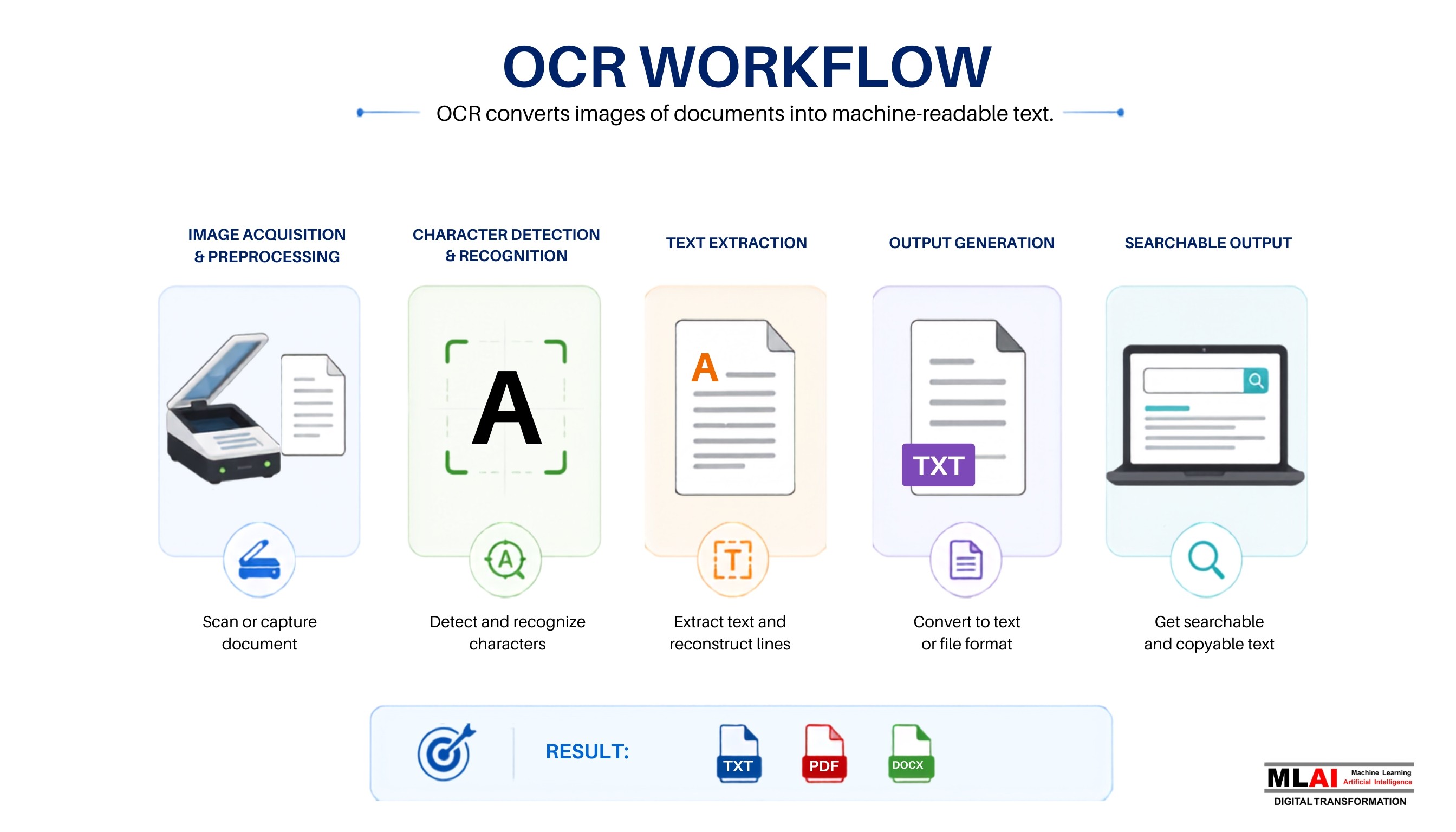
To really appreciate the Document Intelligence vs OCR gap, it helps to look under the hood at how each one actually processes a document.
OCR follows a fairly linear path:
Image acquisition and preprocessing: the document gets scanned or photographed, then cleaned up (deskewed, denoised, contrast-adjusted) so the text is easier to spot.
Character detection and recognition: the software scans the image for letter-shaped patterns and matches them against known letterforms.
Text extraction: recognized characters get stitched into words and lines.
Output generation: the final result comes out as a plain text file, a searchable PDF, or something similar.
That's the typical OCR workflow, and it's efficient for what it's built to do. But it has real limits. OCR has no sense of meaning. It can't tell an invoice number from a phone number unless the layout is fixed and familiar. It struggles with handwriting, blurry scans, and unusual layouts. And because it can't read context, every exception must be caught and fixed by hand.
5.How Document Intelligence Works

Document Intelligence takes a noticeably deeper approach, and this is exactly where the Document Intelligence vs OCR gap becomes obvious.
Document ingestion: Document arrives from anywhere: email, scanners, APIs, or cloud storage.
Document classification: the system identifies what kind of document it's looking at: invoice, contract, ID, or claim form.
OCR layer: text gets pulled from the image, just as traditional OCR would do it.
Layout and structure detection: the system maps out headers, tables, and form fields, learning how the page is organized.
Entity and data extraction: key data points like names, dates, or totals get pulled out and labeled.
Context understanding using NLP: Natural Language Processing reads meaning and intent, not just words.
AI model reasoning: the system applies what it's learned to make sense of tricky or unusual content.
Validation and confidence scoring: extracted data gets checked for accuracy, and low-confidence results get flagged for human review.
Workflow automation and system integration: once validated, data flows directly into ERPs, CRMs, or other systems, often triggering the next step automatically.
Every one of these steps adds a layer of intelligence that plain OCR simply doesn't have. In short: it's the difference between a system that reads and a system that understands, decides, and acts.
6.Document Intelligence vs OCR: A Detailed Comparison
Laying it out side by side makes the Document Intelligence vs OCR gap easy to see at a glance:
Factor | OCR | Document Intelligence |
Purpose | Convert image or text to digital text | Understand, extract, validate, and automate |
Technology stack | Pattern or character recognition | OCR plus AI, ML, NLP, and Computer Vision |
Accuracy | High on clean, standard documents | High across varied, complex, real-world documents |
Context understanding | None | Understands meaning and relationships |
Structured and unstructured support | Structured only | Both |
Handwriting recognition | Poor to unreliable | Strong, model-driven |
Table and form extraction | Limited | Advanced, layout-aware |
Data validation | Manual | Automated, confidence-scored |
Workflow automation | Minimal | Deep, end-to-end |
Scalability | Struggles at high volume or variety | Built for enterprise scale |
Learning capabilities | Static | Continuously improves with data |
Enterprise readiness | Basic digitization | Full-scale operational deployment |
Security and compliance | Limited built-in controls | Enterprise-grade governance features |
Overall business value | Digitization | Automation, accuracy, and decision support |
7.Limitations of Traditional OCR
OCR has certainly earned its spot in enterprise tech stacks over the years. Even so, its ceiling is fairly low for today's document volumes. Here are its biggest limitations:
It's limited to text extraction and has no way to know what that text actually means.
It can't understand context, so it can't distinguish a due date from a shipping date unless the template is fixed and familiar.
It's template-dependent, so any change to a layout can quietly break its accuracy.
Handwritten or low-quality scans remain a weak spot, since character shapes are just too inconsistent.
Manual checks stay heavy, because there's no built-in way to confirm the extracted data is correct.
Automation stays limited on its own, and someone always has to review and route the output.
Complex formats, like multi-column layouts or mixed-language text, remain a real challenge.
None of this makes OCR useless. It simply means OCR alone was never designed to carry enterprise-scale document work on its own.
8.Benefits of Document Intelligence
This is where the Document Intelligence vs OCR gap really pays off for a business. Once AI enters the picture, the benefits stack up quickly:
Higher accuracy, even on messy, inconsistent, or handwritten documents
Faster processing, cutting turnaround from days down to minutes
Less manual work, freeing teams from repetitive data entry
Better efficiency across document-heavy departments
Stronger compliance, backed by traceable, validated data trails
Smart classification that sorts incoming files on its own
Automated decisions, flagging exceptions instead of letting them pile up
Real scalability that grows alongside document volume
Better customer experience, thanks to faster approvals
Lower costs, from cutting the hours spent on manual review
9.Real-World Enterprise Use Cases
9.1 Banking and Financial Services
From loan processing to KYC checks, banks handle an enormous volume of paperwork every single day, and customer onboarding and financial statement analysis only add to the stack. Document Intelligence speeds up approvals while simultaneously lowering compliance risk. Our work with ICICI Bank is a good example of this in action: four AI agents work together there, turning classification, extraction, verification, and signature matching into one smooth, connected process.
9.2 Insurance
Claims processing, policy checks, and fraud detection all depend on reading and cross-checking documents quickly and accurately. This is exactly where AI Document Processing shines. It scans every claim and policy in seconds, matches the details against records, and quietly flags anything suspicious before it becomes a costly mistake.
9.3 Healthcare
Medical records, patient onboarding, and insurance paperwork are dense, inconsistent, and often handwritten. This space gains a lot from smart classification and extraction. The AI sorts each document into the right category and pulls out the important information, even from messy handwriting, so staff spend less time on paperwork and more time on patients.
9.4 Manufacturing
Purchase orders, supplier invoices, delivery notes, and quality documents flow nonstop between vendors and plants. Automation here keeps supply chains moving without bottlenecks. The system reads and matches these documents automatically, catching mismatches early so orders don't stall and production stays on schedule.
9.5 Legal
Contract review, clause extraction, and compliance checks are traditionally slow and expensive. Document Intelligence can meaningfully speed up all of it. It reads through long contracts, pulls out the exact clauses that matter, and highlights compliance risks, turning days of manual review into minutes.
9.6 Human Resources
Onboarding paperwork, resume screening, and payroll documents all involve document-heavy work that's ripe for automation. The AI reads resumes and forms, extracts the key details, and organizes everything neatly, so HR teams can onboard faster and skip the repetitive data entry.
10.When OCR Is the Right Choice
Not every Document Intelligence vs OCR decision needs a complicated answer. OCR still has a genuine place. It's the right tool when you're:
Digitizing printed books or archives
Turning scanned PDFs into searchable files
Running basic archival projects
Working with simple forms in a predictable layout
Handling low-complexity work with little variation
If the task is straightforward digitizing, with no real need for understanding, OCR is a light, low-cost option that gets the job done.
11.When Document Intelligence Is the Better Choice
For most enterprises, though, the Document Intelligence vs OCR decision tips firmly toward AI. Document Intelligence becomes a near-necessity once you're dealing with:
Large-scale enterprise document processing
Invoice automation
Contract management
KYC and compliance workflows
Multi-format document processing
Smart document classification
Automated approval workflows
Broader business process automation
In short: if your documents vary in format, your volume is high, and speed or accuracy genuinely matters, Document Intelligence is built for exactly that. OCR alone was never designed to handle it.
12. The Role of AI in Modern Document Processing
Modern Enterprise Document Processing runs on several AI tools working in concert. Machine Learning spots patterns across thousands of document types. Natural Language Processing reads meaning and context in text. Computer Vision reads layout and visual details, like signatures or stamps. On top of all that, Large Language Models (LLMs) add a layer of reasoning, helping systems make sense of messy or unstructured content with near-human understanding.
According to Gartner, the intelligent document processing market now includes well over 100 vendors, a clear signal of just how central this technology has become to enterprise operations.
Together, these tools power AI-powered data extraction and smart document understanding, turning a manual, error-prone process into a genuinely automated workflow. As enterprises weave more AI into their systems, document processing is shifting from a back-office chore into a real driver of speed and competitive advantage.
13. How to Choose the Right Document Processing Solution
Ready to settle your own Document Intelligence vs OCR decision? Before picking a tool, it's worth asking a few honest questions:
How many documents are you processing, and how often?
How varied are your document types: standard forms, or a mix of formats and languages?
What accuracy level do you need for the decisions riding on this data?
Do you have compliance needs that call for traceability and validation?
Does the tool need to plug into your existing systems?
What are your security and governance needs?
Will your document volume grow? Can the tool scale with it?
Do you need future AI features, like predictive analytics or self-running workflows?
14. Future of Enterprise Document Processing
The direction is clear. Intelligent Document Processing is moving from "nice to have" to core infrastructure. AI Agents are starting to run entire document workflows on their own. Multimodal AI lets systems read text, images, and structure together in a single pass. Autonomous workflows are cutting the need for constant human input, though human-in-the-loop checks still matter, keeping oversight in place for edge cases and high-stakes decisions.
Enterprise AI platforms are increasingly building around predictive document analytics, spotting patterns and flagging risks early instead of simply processing what's already in front of them. As digital transformation spreads across industries, Document Intelligence is fast becoming one of its most useful building blocks.
Conclusion
So, where does that leave the Document Intelligence vs OCR question? OCR is still a solid, reliable tool for basic text extraction. It's great for digitizing books, archiving scans, and reading simple forms. But it was never built to understand what it reads. Document Intelligence starts from that same foundation and adds layers of AI, ML, NLP, and Computer Vision, which means it can classify, validate, and automate document work at true enterprise scale.
For businesses handling high volumes of varied, complex documents, this distinction matters a great deal. Adopting AI-powered Document Processing isn't just an upgrade. It's a shift toward real efficiency, stronger accuracy, and a system that scales as the business grows. As enterprises keep pushing toward smarter automation, Document Intelligence vs OCR is really no longer a close call. Document Intelligence is fast becoming the standard, not the exception.
Introduction
Document Intelligence vs OCR is a question that comes up in almost every enterprise IT meeting these days, and for good reason. Every office is drowning in paperwork: stray PDFs on shared drives, unread invoices in the inbox, scanned contracts nobody has time to read, forms that still need to be typed into a system by hand.
That volume doesn't scale by hand. One missed invoice, one mistyped account number, one overlooked clause in a contract, and the cost of "we'll just do it manually" adds up fast.
For a long time, Optical Character Recognition (OCR) was the answer everyone reached for. It turned a scanned page into searchable text, and it still earns its keep today. But OCR was built to read letters, not to understand them. It can confirm that a page contains the word "invoice." It has no idea whether that invoice is correct.
1.Why This Comparison Matters Now
That's where Document Intelligence steps in. Built on AI, Machine Learning, NLP, and Computer Vision, it doesn't just read a document; it interprets it and then acts on what it finds.
This is the real heart of the Document Intelligence vs OCR conversation in enterprise IT today. The question isn't "can we digitize this?" anymore. It's "can our systems understand this document and do something useful with it?"
This article breaks down what OCR really does, how Document Intelligence builds on it, and where each one fits best, so you have a clear answer to the Document Intelligence vs OCR question.
2.What Is OCR?
In any Document Intelligence vs OCR comparison, OCR is the older, simpler technology of the two, and there's nothing wrong with that. Optical Character Recognition converts scanned images, photographs, or PDFs into text a computer can read. Think of it as a translator sitting between the paper world and the digital one. Feed it a scanned page, and it hands you back text you can search, copy, and store.
Mechanically, it's straightforward. OCR scans an image looking for shapes that resemble letters and numbers, compares those shapes against known character patterns, and converts the matches into digital text. It's pattern matching, plain and simple: pixels become characters, one letter at a time.
Businesses have leaned on OCR for years to digitize books, turn old receipts into searchable text, and archive stacks of paperwork that would otherwise gather dust. It works well on simple, standardized forms. It's fast, it's inexpensive, and it's dependable, if the layout is predictable, and the scan quality is decent.
So, OCR genuinely has strengths. It's mature, widely available, and it does one job well: pulling text off a page. It performs best on clean, single-format documents like printed forms or tidy PDF scans. But ask it to do anything more nuanced, and its limits show up fast.
3.What Is Document Intelligence?
On the other side of the Document Intelligence vs OCR comparison sits Document Intelligence, the AI-driven half of the equation. Put simply, it's the next logical step after OCR. It combines OCR with AI, so a system doesn't just read a document, it actually understands it. Instead of stopping at "here's the text on this page," it keeps going: it identifies what type of document it's looking at, pulls out the key data points, links those data points together, and checks whether the information actually makes sense.
Importantly, Document Intelligence doesn't replace OCR. It builds on it. OCR usually still plays the opening role, converting the image into raw text. Then AI layers on top, reading context, spotting structure, and making decisions based on what it finds.
This combination is often called Intelligent Document Processing, or IDP, a fast-growing branch of AI Document Processing. A capable Document Intelligence Platform can typically sort documents on its own, pull both structured and unstructured data, read tables and forms, interpret handwriting, and score its own confidence before a human ever needs to look at the output.
So why are enterprises moving toward AI-powered Document Processing? Because it solves the one problem, OCR simply can't: scaling without losing accuracy. When you're processing thousands of invoices or claims a day, "reading" the text isn't enough. You need a system that understands what it's reading, and one that can route, check, and act on it, largely on its own.
4.How OCR Works
To really appreciate the Document Intelligence vs OCR gap, it helps to look under the hood at how each one actually processes a document.
OCR follows a fairly linear path:
Image acquisition and preprocessing: the document gets scanned or photographed, then cleaned up (deskewed, denoised, contrast-adjusted) so the text is easier to spot.
Character detection and recognition: the software scans the image for letter-shaped patterns and matches them against known letterforms.
Text extraction: recognized characters get stitched into words and lines.
Output generation: the final result comes out as a plain text file, a searchable PDF, or something similar.
That's the typical OCR workflow, and it's efficient for what it's built to do. But it has real limits. OCR has no sense of meaning. It can't tell an invoice number from a phone number unless the layout is fixed and familiar. It struggles with handwriting, blurry scans, and unusual layouts. And because it can't read context, every exception must be caught and fixed by hand.
5.How Document Intelligence Works
Document Intelligence takes a noticeably deeper approach, and this is exactly where the Document Intelligence vs OCR gap becomes obvious.
Document ingestion: Document arrives from anywhere: email, scanners, APIs, or cloud storage.
Document classification: the system identifies what kind of document it's looking at: invoice, contract, ID, or claim form.
OCR layer: text gets pulled from the image, just as traditional OCR would do it.
Layout and structure detection: the system maps out headers, tables, and form fields, learning how the page is organized.
Entity and data extraction: key data points like names, dates, or totals get pulled out and labeled.
Context understanding using NLP: Natural Language Processing reads meaning and intent, not just words.
AI model reasoning: the system applies what it's learned to make sense of tricky or unusual content.
Validation and confidence scoring: extracted data gets checked for accuracy, and low-confidence results get flagged for human review.
Workflow automation and system integration: once validated, data flows directly into ERPs, CRMs, or other systems, often triggering the next step automatically.
Every one of these steps adds a layer of intelligence that plain OCR simply doesn't have. In short: it's the difference between a system that reads and a system that understands, decides, and acts.
6.Document Intelligence vs OCR: A Detailed Comparison
Laying it out side by side makes the Document Intelligence vs OCR gap easy to see at a glance:
Factor | OCR | Document Intelligence |
Purpose | Convert image or text to digital text | Understand, extract, validate, and automate |
Technology stack | Pattern or character recognition | OCR plus AI, ML, NLP, and Computer Vision |
Accuracy | High on clean, standard documents | High across varied, complex, real-world documents |
Context understanding | None | Understands meaning and relationships |
Structured and unstructured support | Structured only | Both |
Handwriting recognition | Poor to unreliable | Strong, model-driven |
Table and form extraction | Limited | Advanced, layout-aware |
Data validation | Manual | Automated, confidence-scored |
Workflow automation | Minimal | Deep, end-to-end |
Scalability | Struggles at high volume or variety | Built for enterprise scale |
Learning capabilities | Static | Continuously improves with data |
Enterprise readiness | Basic digitization | Full-scale operational deployment |
Security and compliance | Limited built-in controls | Enterprise-grade governance features |
Overall business value | Digitization | Automation, accuracy, and decision support |
7.Limitations of Traditional OCR
OCR has certainly earned its spot in enterprise tech stacks over the years. Even so, its ceiling is fairly low for today's document volumes. Here are its biggest limitations:
It's limited to text extraction and has no way to know what that text actually means.
It can't understand context, so it can't distinguish a due date from a shipping date unless the template is fixed and familiar.
It's template-dependent, so any change to a layout can quietly break its accuracy.
Handwritten or low-quality scans remain a weak spot, since character shapes are just too inconsistent.
Manual checks stay heavy, because there's no built-in way to confirm the extracted data is correct.
Automation stays limited on its own, and someone always has to review and route the output.
Complex formats, like multi-column layouts or mixed-language text, remain a real challenge.
None of this makes OCR useless. It simply means OCR alone was never designed to carry enterprise-scale document work on its own.
8.Benefits of Document Intelligence
This is where the Document Intelligence vs OCR gap really pays off for a business. Once AI enters the picture, the benefits stack up quickly:
Higher accuracy, even on messy, inconsistent, or handwritten documents
Faster processing, cutting turnaround from days down to minutes
Less manual work, freeing teams from repetitive data entry
Better efficiency across document-heavy departments
Stronger compliance, backed by traceable, validated data trails
Smart classification that sorts incoming files on its own
Automated decisions, flagging exceptions instead of letting them pile up
Real scalability that grows alongside document volume
Better customer experience, thanks to faster approvals
Lower costs, from cutting the hours spent on manual review
9.Real-World Enterprise Use Cases
9.1 Banking and Financial Services
From loan processing to KYC checks, banks handle an enormous volume of paperwork every single day, and customer onboarding and financial statement analysis only add to the stack. Document Intelligence speeds up approvals while simultaneously lowering compliance risk. Our work with ICICI Bank is a good example of this in action: four AI agents work together there, turning classification, extraction, verification, and signature matching into one smooth, connected process.
9.2 Insurance
Claims processing, policy checks, and fraud detection all depend on reading and cross-checking documents quickly and accurately. This is exactly where AI Document Processing shines. It scans every claim and policy in seconds, matches the details against records, and quietly flags anything suspicious before it becomes a costly mistake.
9.3 Healthcare
Medical records, patient onboarding, and insurance paperwork are dense, inconsistent, and often handwritten. This space gains a lot from smart classification and extraction. The AI sorts each document into the right category and pulls out the important information, even from messy handwriting, so staff spend less time on paperwork and more time on patients.
9.4 Manufacturing
Purchase orders, supplier invoices, delivery notes, and quality documents flow nonstop between vendors and plants. Automation here keeps supply chains moving without bottlenecks. The system reads and matches these documents automatically, catching mismatches early so orders don't stall and production stays on schedule.
9.5 Legal
Contract review, clause extraction, and compliance checks are traditionally slow and expensive. Document Intelligence can meaningfully speed up all of it. It reads through long contracts, pulls out the exact clauses that matter, and highlights compliance risks, turning days of manual review into minutes.
9.6 Human Resources
Onboarding paperwork, resume screening, and payroll documents all involve document-heavy work that's ripe for automation. The AI reads resumes and forms, extracts the key details, and organizes everything neatly, so HR teams can onboard faster and skip the repetitive data entry.
10.When OCR Is the Right Choice
Not every Document Intelligence vs OCR decision needs a complicated answer. OCR still has a genuine place. It's the right tool when you're:
Digitizing printed books or archives
Turning scanned PDFs into searchable files
Running basic archival projects
Working with simple forms in a predictable layout
Handling low-complexity work with little variation
If the task is straightforward digitizing, with no real need for understanding, OCR is a light, low-cost option that gets the job done.
11.When Document Intelligence Is the Better Choice
For most enterprises, though, the Document Intelligence vs OCR decision tips firmly toward AI. Document Intelligence becomes a near-necessity once you're dealing with:
Large-scale enterprise document processing
Invoice automation
Contract management
KYC and compliance workflows
Multi-format document processing
Smart document classification
Automated approval workflows
Broader business process automation
In short: if your documents vary in format, your volume is high, and speed or accuracy genuinely matters, Document Intelligence is built for exactly that. OCR alone was never designed to handle it.
12. The Role of AI in Modern Document Processing
Modern Enterprise Document Processing runs on several AI tools working in concert. Machine Learning spots patterns across thousands of document types. Natural Language Processing reads meaning and context in text. Computer Vision reads layout and visual details, like signatures or stamps. On top of all that, Large Language Models (LLMs) add a layer of reasoning, helping systems make sense of messy or unstructured content with near-human understanding.
According to Gartner, the intelligent document processing market now includes well over 100 vendors, a clear signal of just how central this technology has become to enterprise operations.
Together, these tools power AI-powered data extraction and smart document understanding, turning a manual, error-prone process into a genuinely automated workflow. As enterprises weave more AI into their systems, document processing is shifting from a back-office chore into a real driver of speed and competitive advantage.
13. How to Choose the Right Document Processing Solution
Ready to settle your own Document Intelligence vs OCR decision? Before picking a tool, it's worth asking a few honest questions:
How many documents are you processing, and how often?
How varied are your document types: standard forms, or a mix of formats and languages?
What accuracy level do you need for the decisions riding on this data?
Do you have compliance needs that call for traceability and validation?
Does the tool need to plug into your existing systems?
What are your security and governance needs?
Will your document volume grow? Can the tool scale with it?
Do you need future AI features, like predictive analytics or self-running workflows?
14. Future of Enterprise Document Processing
The direction is clear. Intelligent Document Processing is moving from "nice to have" to core infrastructure. AI Agents are starting to run entire document workflows on their own. Multimodal AI lets systems read text, images, and structure together in a single pass. Autonomous workflows are cutting the need for constant human input, though human-in-the-loop checks still matter, keeping oversight in place for edge cases and high-stakes decisions.
Enterprise AI platforms are increasingly building around predictive document analytics, spotting patterns and flagging risks early instead of simply processing what's already in front of them. As digital transformation spreads across industries, Document Intelligence is fast becoming one of its most useful building blocks.
Conclusion
So, where does that leave the Document Intelligence vs OCR question? OCR is still a solid, reliable tool for basic text extraction. It's great for digitizing books, archiving scans, and reading simple forms. But it was never built to understand what it reads. Document Intelligence starts from that same foundation and adds layers of AI, ML, NLP, and Computer Vision, which means it can classify, validate, and automate document work at true enterprise scale.
For businesses handling high volumes of varied, complex documents, this distinction matters a great deal. Adopting AI-powered Document Processing isn't just an upgrade. It's a shift toward real efficiency, stronger accuracy, and a system that scales as the business grows. As enterprises keep pushing toward smarter automation, Document Intelligence vs OCR is really no longer a close call. Document Intelligence is fast becoming the standard, not the exception.
Related Blogs
Be the first to read our articles.

